
Asset discovery: every device, what it is, and whether it is exposed
MagenX finds the devices that answer on your network and says what each one is, whether Active Directory knows it, whether an endpoint agent protects it, and whether a firewall publishes it to the internet.
An asset inventory of every device that answers
Every sweep produces one view of everything that answered, and the Assets page keeps every device across sweeps. For each device you see what it is, by operating system, maker, model and class; where it sits, by site; whether Active Directory knows it and whether its account is enabled; whether SentinelOne or CrowdStrike protects it; which ports and services answer; and whether a firewall publishes it to the internet.
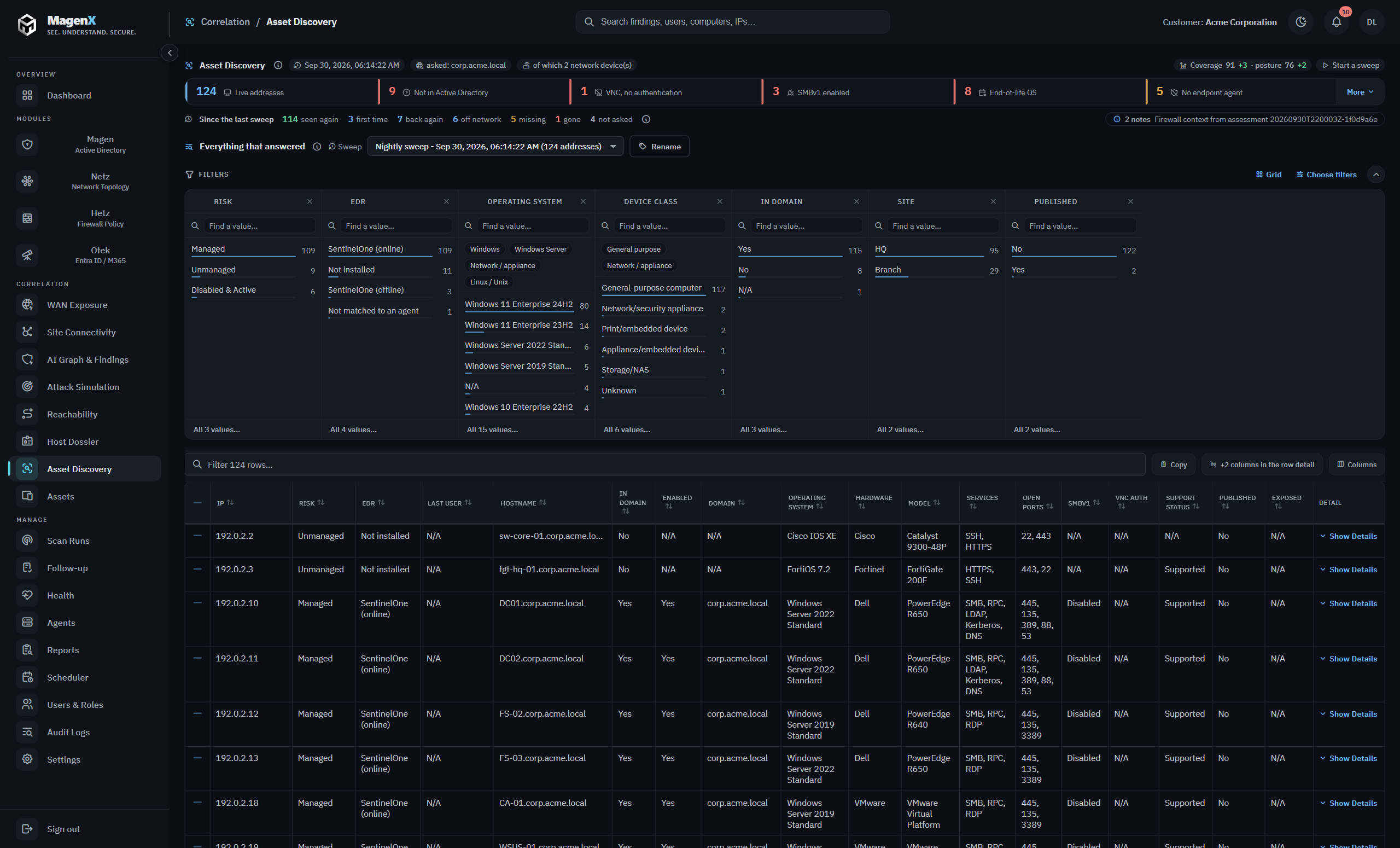
What needs attention first
The tiles at the top count what a security team acts on: devices with no computer account, VNC consoles that ask for no password, SMBv1 still enabled, operating systems past end of life, and computers with no endpoint agent. Coverage says how much of the estate the sweep actually measured, and posture says how the measured part stands, each with its change since the last sweep, so a quieter network never reads as a safer one.
Unmanaged devices and other shadow IT
- Devices answering on a documented subnet with no computer account in Active Directory
- Machines whose account is disabled in Active Directory, still switched on and answering
- Machines an endpoint console manages that the directory does not know
- Operating systems past end of life, named by version where the version can be read
- Printers, storage, management controllers and other embedded devices, by maker and model where the device states them
- Devices on subnets Active Directory documents but has not linked to a site
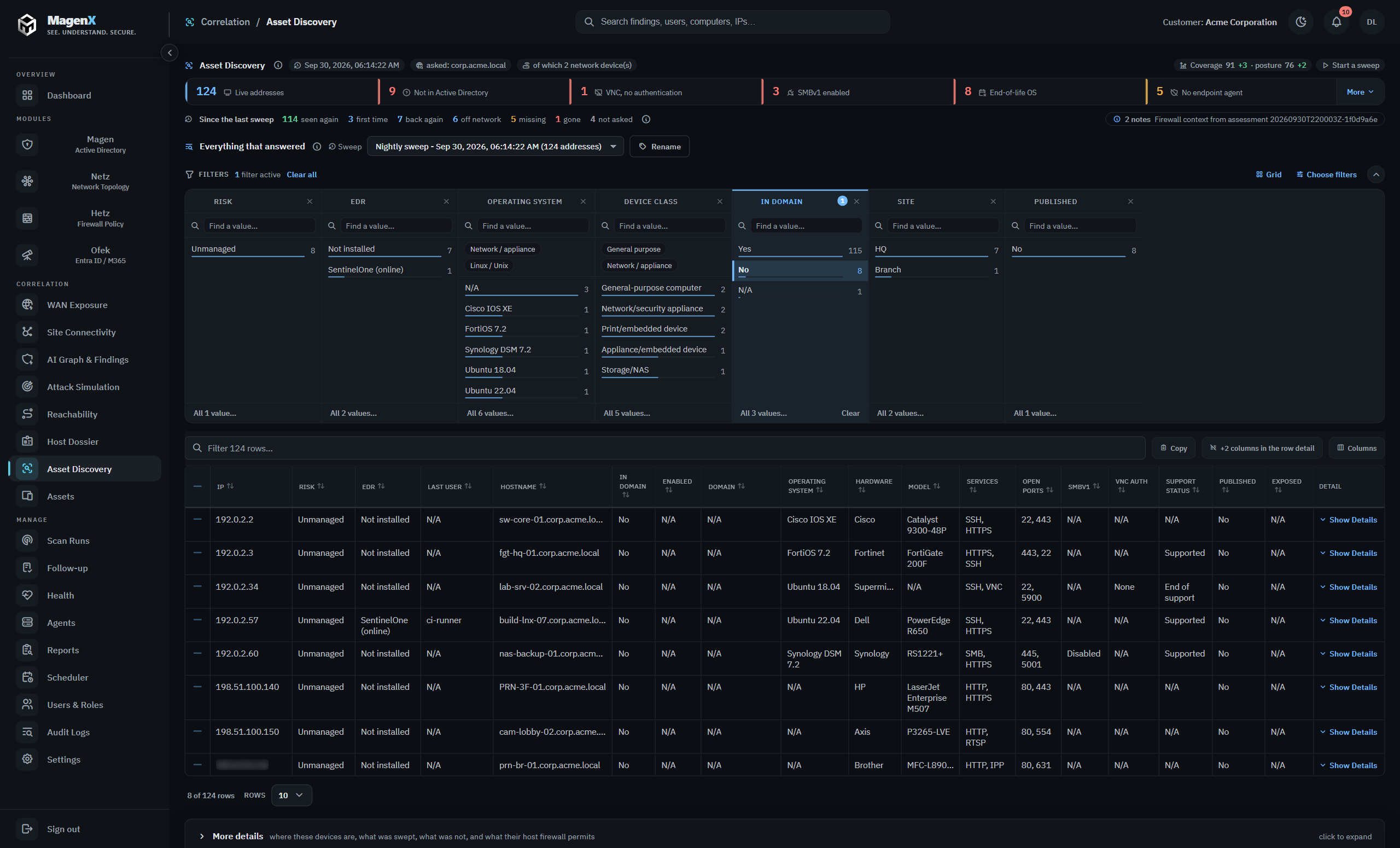
| Address | Risk | In domain | Operating system | Device class | EDR |
|---|---|---|---|---|---|
| 192.0.2.34 | Unmanaged | No | Ubuntu 18.04 | General-purpose computer | Not installed |
| 192.0.2.60 | Unmanaged | No | Synology DSM 7.2 | Storage/NAS | Not installed |
| 198.51.100.88 | Disabled & Active | Yes | Windows 10 Enterprise 22H2 | General-purpose computer | SentinelOne (offline) |
| 192.0.2.3 | Unmanaged | No | FortiOS 7.2 | Network/security appliance | Not installed |
| 192.0.2.66 | Unmanaged | No | Unknown | Out-of-band management | Not installed |
Sample data. Names, addresses and rules are illustrative.
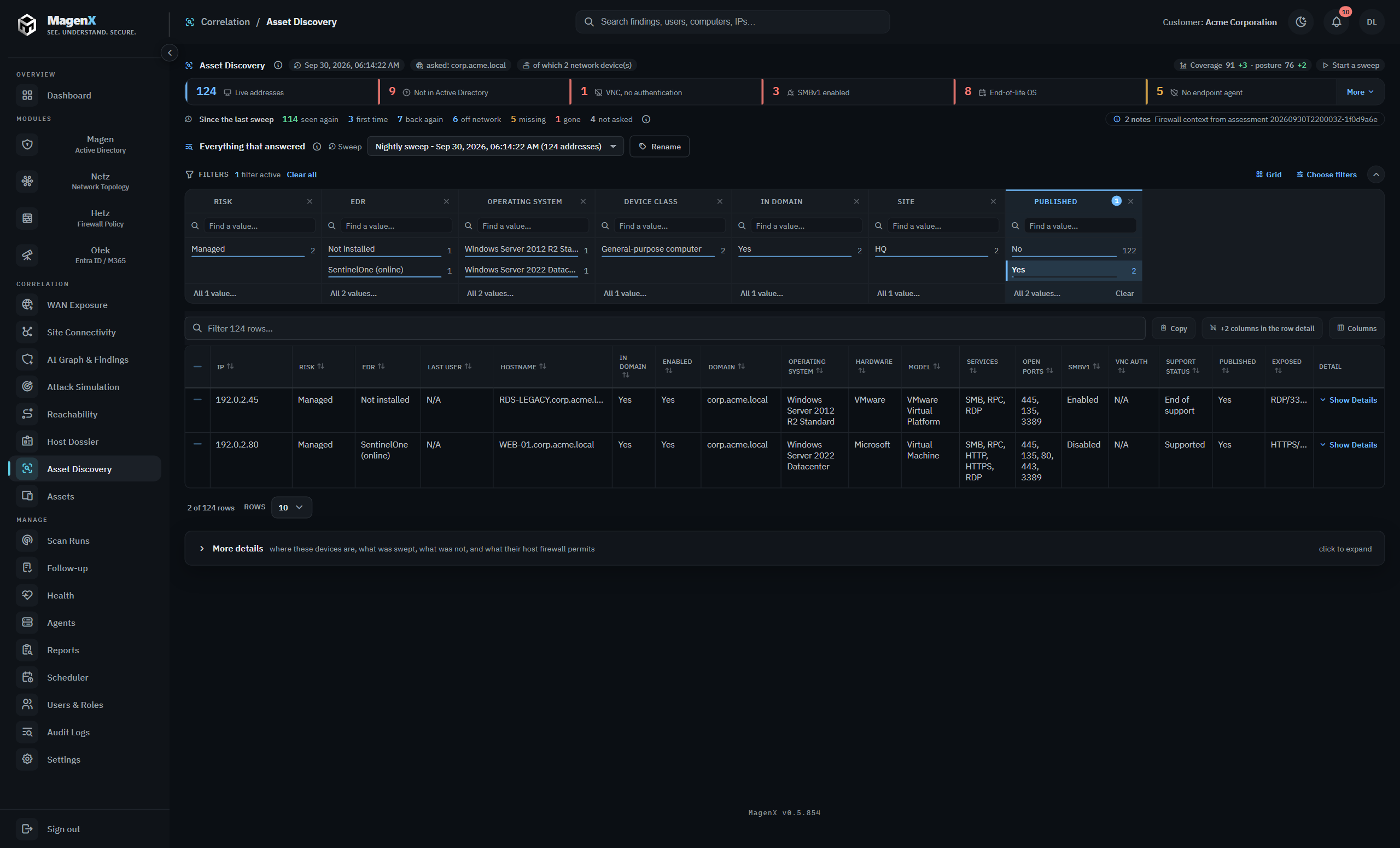
Published to the internet
Every device the sweep finds is checked against the firewall. When a VIP publishes it to the internet, the row says so, with the public address, the services the firewall lets through, and the rule that publishes it. A domain-joined server published to the internet on remote desktop with no endpoint agent is exactly the combination the correlation layer raises as a finding.
Which internal networks can reach a device, and through which rule, is answered for any host in its Host Dossier, together with the host firewall its endpoint console applies.
EDR coverage, device by device
Each computer is checked against SentinelOne or CrowdStrike Falcon, and the answer is one of four: protected, no agent, an agent that has gone silent while the machine kept answering, or unknown when a console could not be read or no agent could be matched with certainty. A console that could not be read never turns into an unprotected estate. How coverage adds up is on the EDR coverage page.
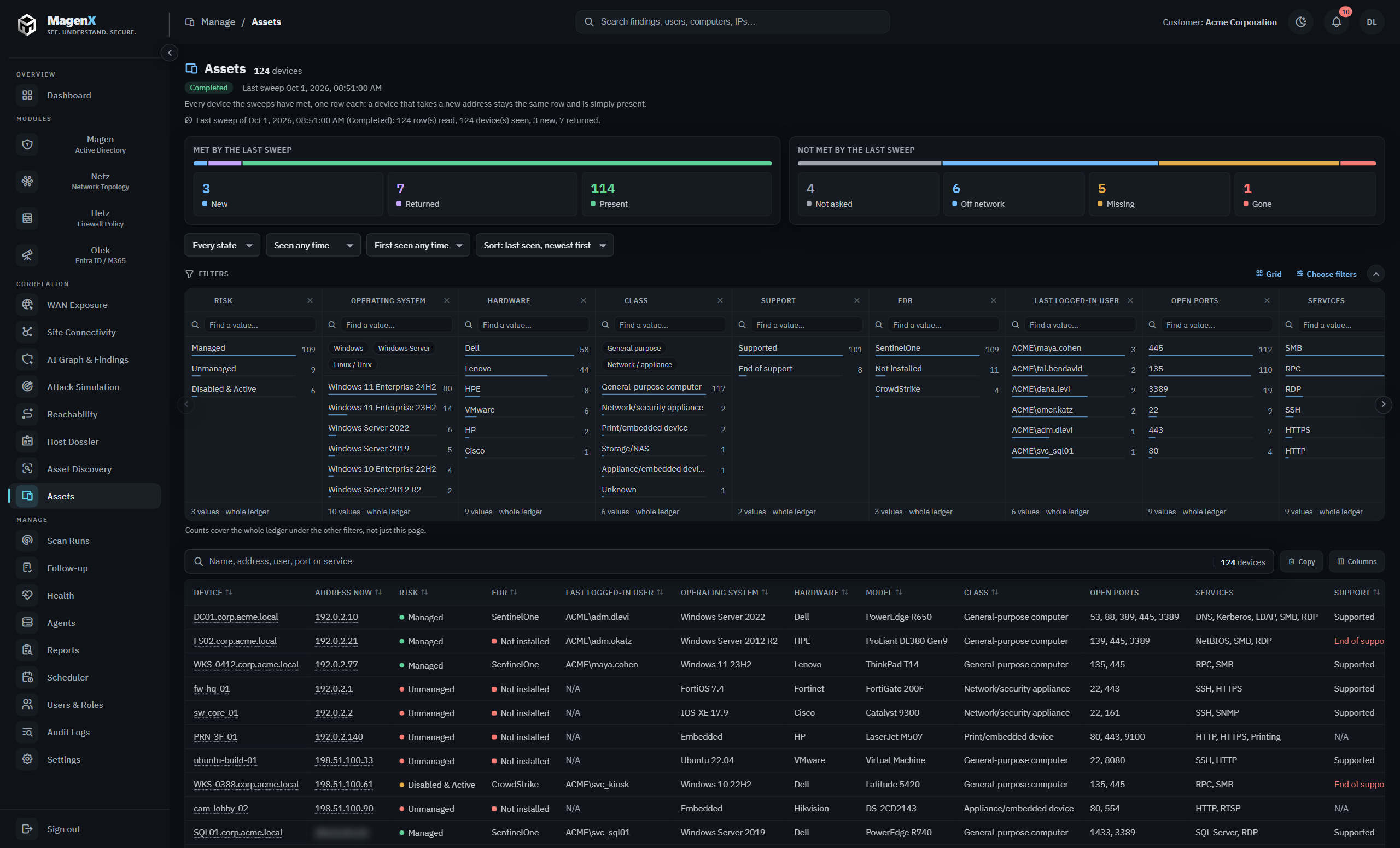
One device, across sweeps
The Assets page keeps one row per device, whatever address it takes, so a laptop on a new lease or on the VPN stays the same device. It says what the last sweep met: new, returned or present. What it did not meet is split four ways: not asked, off network while a DHCP lease, a console check-in or a recent logon still vouches for it, missing, and gone. A device is called gone only after a full sweep, misses at several different hours of the day, and about four months of silence.
Honest about what it could not see
Every row says how sure MagenX is of the operating system, from confirmed down to guessed, and a device it cannot classify is shown as Unknown rather than guessed. A subnet the sweep never reached counts against coverage, so it cannot read as a clean one.
Bounds and consent
Discovery is off until an administrator turns it on. It covers the subnets Active Directory documents, and an administrator can narrow that list but never widen it. It changes nothing on the devices it finds. A sweep can be split across MagenX scan agents at other sites, and every result lands in the same list.
What it does not do
It does not change anything on a device or run an exploit, and it raises no findings of its own: findings such as an unmanaged device published to the internet are raised by the correlation layer, with the device and the rule beside them. It does not guess what a device is; what it cannot classify is shown as Unknown.
FAQ
Does it work on an isolated network?
Yes. Discovery runs inside the network it covers, the directory, DNS and the consoles are inside it too, and results never leave the site.
Does a laptop that changes address become a new device?
No. The Assets page keeps one row per device whatever address it takes, so a laptop on a new lease or on the VPN stays the same device.
Is it safe to run on production?
Yes. It sends only what any client on the network could send, it changes nothing, it is off until enabled, and it covers only the subnets Active Directory documents, narrowed further if you choose.
Does discovery change the security score?
No. Discovery raises no findings and does not move the estate score. It has its own coverage and posture numbers with a trend, and the correlation layer raises findings from what it found, such as an unmanaged device published to the internet.
Which endpoint consoles does it check?
SentinelOne and CrowdStrike Falcon, with read permission. A console that cannot be read leaves every row Unknown, never Not installed.
What does "gone" mean, exactly?
A full sweep missed the device at several different hours of the day, including an hour it has answered at before, it has been silent for about four months, and no DHCP lease, console check-in or domain logon still vouches for it. Until then it is missing or off network.
Read next
Which of these machines carry an endpoint agent, and where the gaps sit, is on the EDR coverage page. EDR coverage: the machines your endpoint console does not protect
Where the found devices sit, and which subnets mix tiers, is the network assessment. Network security assessment
What the internet or the user VLAN can reach on a found device is answered by the reachability analysis. Reachability analysis, from the source to the last hop
Last revised 2026-10-27.
Every finding above is evidence you can hand to the person who owns the object.
Get a demo